Daniel Ly.

Designer

Daniel Ly.

Designer

Daniel Ly.

Designer

Daniel Ly.

Designer

AI-Assisted Expense Management

Product Strategy & UX Concept

Project type

Product concept & UX exploration


Problem space

High-volume expense management and policy enforcement


Users

Employees, people managers, finance teams


Role

Lead designer exploring product direction, workflows, and AI opportunities


Context

This project explores how AI-assisted workflows can improve expense review, approval, and compliance for employees, managers, and finance teams.

The work focuses on designing scalable UX patterns for high-volume expense management, emphasizing clarity, exception handling, and decision confidence for different user roles.
Project type

Product concept & UX exploration


Problem space

High-volume expense management and policy enforcement


Users

Employees, people managers, finance teams


Role

Lead designer exploring product direction, workflows, and AI opportunities


Context

This project explores how AI-assisted workflows can improve expense review, approval, and compliance for employees, managers, and finance teams.

The work focuses on designing scalable UX patterns for high-volume expense management, emphasizing clarity, exception handling, and decision confidence for different user roles.
Project type

Product concept & UX exploration


Problem space

High-volume expense management and policy enforcement


Users

Employees, people managers, finance teams


Role

Lead designer exploring product direction, workflows, and AI opportunities


Context

This project explores how AI-assisted workflows can improve expense review, approval, and compliance for employees, managers, and finance teams.

The work focuses on designing scalable UX patterns for high-volume expense management, emphasizing clarity, exception handling, and decision confidence for different user roles.
Project type

Product concept & UX exploration


Problem space

High-volume expense management and policy enforcement


Users

Employees, people managers, finance teams


Role

Lead designer exploring product direction, workflows, and AI opportunities


Context

This project explores how AI-assisted workflows can improve expense review, approval, and compliance for employees, managers, and finance teams.

The work focuses on designing scalable UX patterns for high-volume expense management, emphasizing clarity, exception handling, and decision confidence for different user roles.
Problem Space & Constraints


Expense management breaks down at scale.

As organizations grow, managers and finance teams are required to review and approve an increasing volume of expenses, each with different policy rules, risk levels, and time sensitivity. The challenge is less about submitting expenses and more about enabling fast, confident decisions without sacrificing compliance or oversight.


The problem is compounded by:
  • High approval volume with limited reviewer time

  • Inconsistent expense quality and missing context

  • Policy rules that vary by category, role, and vendor

  • A need to balance speed, trust, and financial control


Different roles experience this problem very differently.

Employees want fast reimbursement and clarity on what’s acceptable. Managers need to approve quickly without reading every detail. Finance teams are accountable for policy enforcement, audits, and long-term spend health.

Any solution must support these competing priorities without overloading one role to protect another.


Key constraints considered in this exploration:
  • Reviewers cannot deeply inspect every expense at scale

  • Automation must remain explainable and auditable

  • False positives create distrust in AI-assisted decisions

  • Policy enforcement needs consistency across teams

  • The system must surface exceptions without hiding the full picture


Success in this problem space is not eliminating manual review, but reducing cognitive load while increasing confidence. The system should help users understand where to pay attention, why an expense matters, and what action is appropriate.

User Roles & Decision Responsibilities


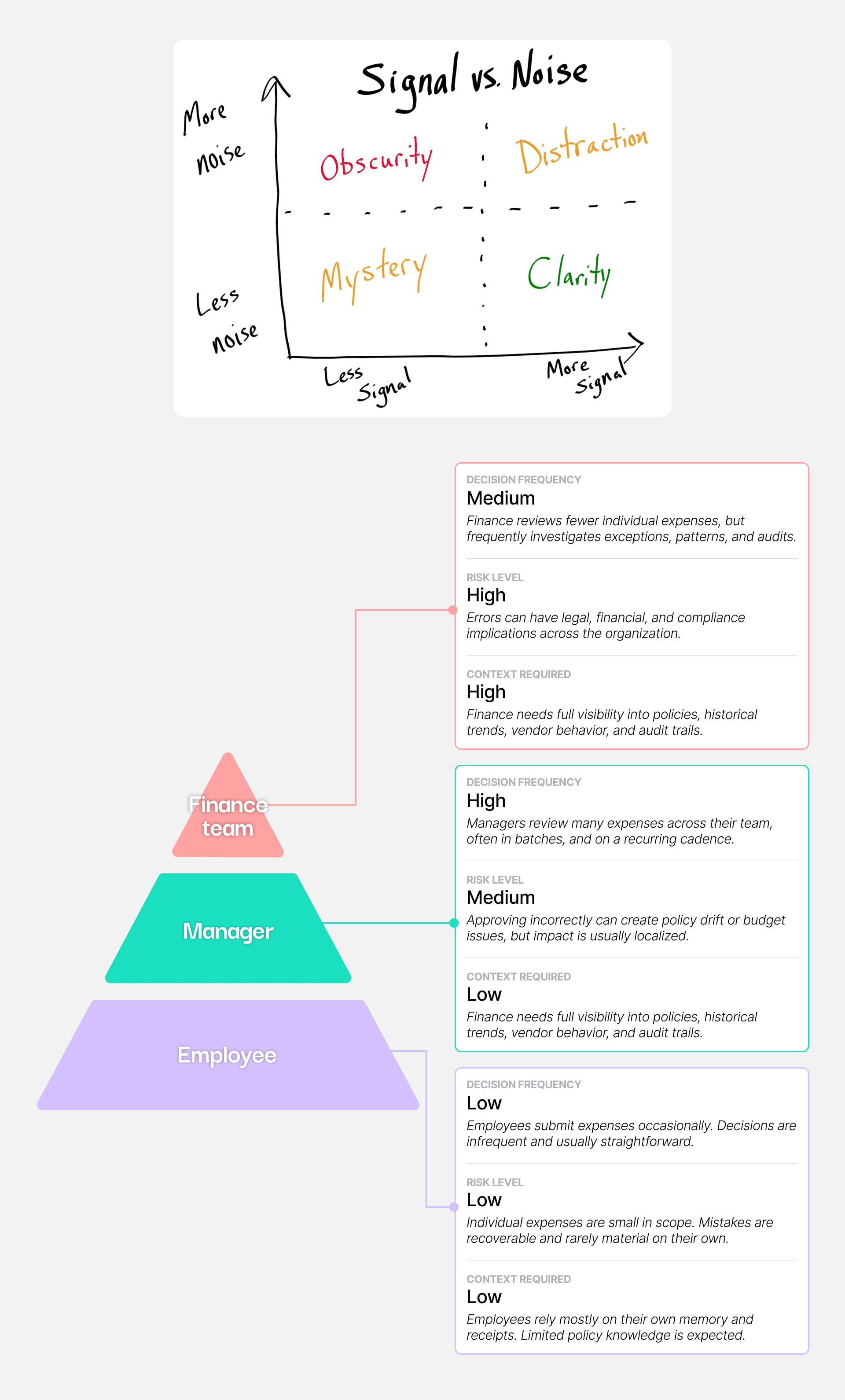
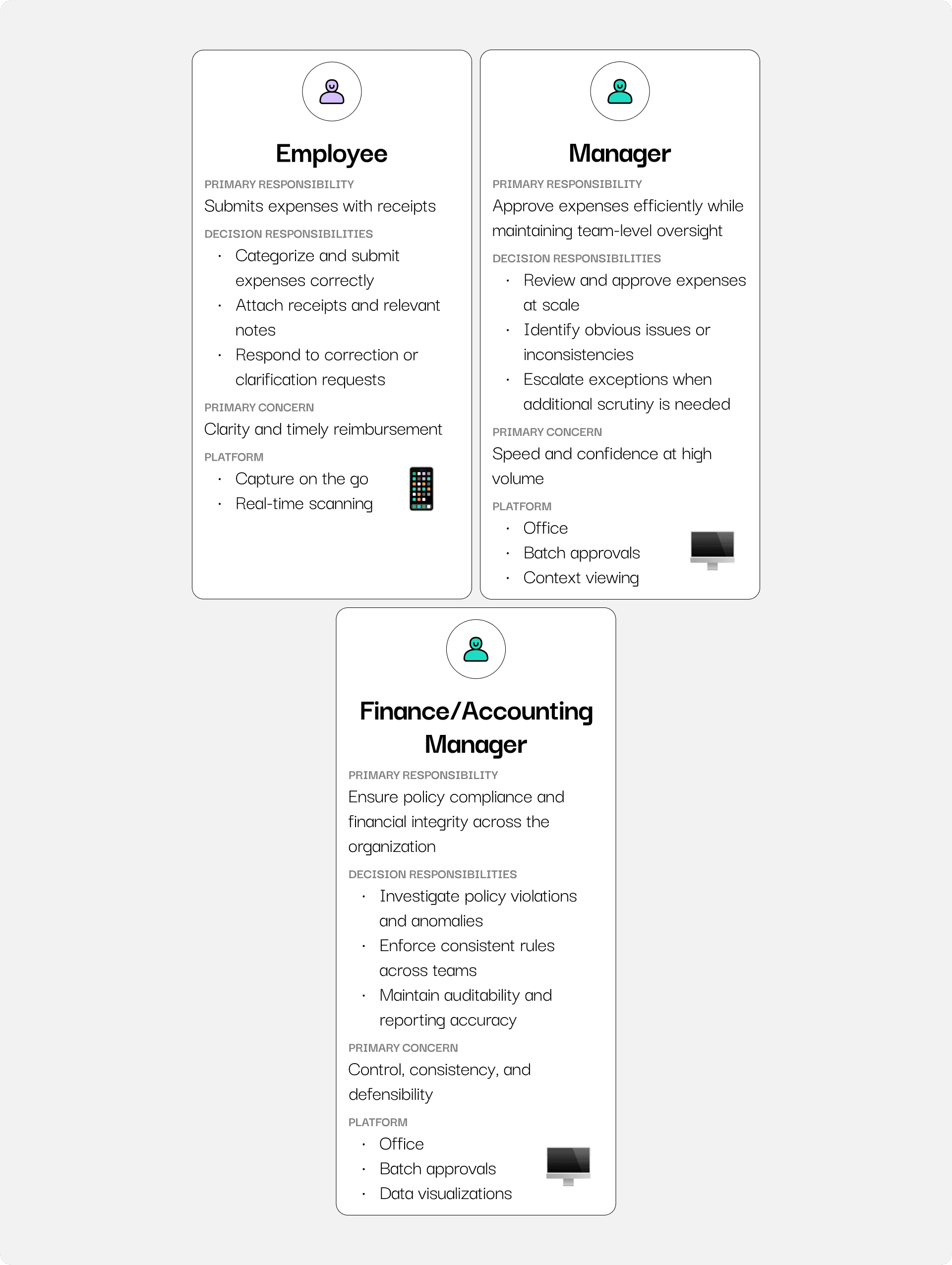
In expense management, different roles are not just users of the system. They are decision-makers with varying levels of risk, context, and accountability. This exploration focuses on how responsibilities shift across roles and how the product must adapt accordingly.


Employee

Employees submit expenses and are primarily concerned with reimbursement speed and clarity around what is acceptable. Their decisions carry low financial risk individually, but poor input quality creates downstream friction for managers and finance teams.


Decision responsibilities:
  • Categorize and submit expenses accurately

  • Provide sufficient context (receipts, notes)

  • Correct issues when flagged


The system should guide employees toward policy-compliant behavior upfront, reducing avoidable exceptions later in the workflow.


Manager

Managers review a high volume of expenses across their team. Each decision carries moderate financial and trust implications, but managers often lack the time or context to deeply inspect every submission.


Decision responsibilities:
  • Approve or reject expenses efficiently

  • Spot obvious issues or anomalies

  • Balance trust in employees with oversight


Managers need fast paths for low-risk approvals and clear signals when an expense requires closer attention.


Finance

Finance teams oversee organization-wide spend and are accountable for policy enforcement, audits, and financial integrity. Their decisions are lower in frequency but higher in consequence.


Decision responsibilities:
  • Identify policy violations and anomalies

  • Ensure consistency across teams

  • Maintain auditability and reporting accuracy


Finance teams need visibility into patterns and exceptions, not just individual expenses, and require explainable signals they can trust.

Happy Paths by Role

Role-specific workflows optimized for decision frequency and risk


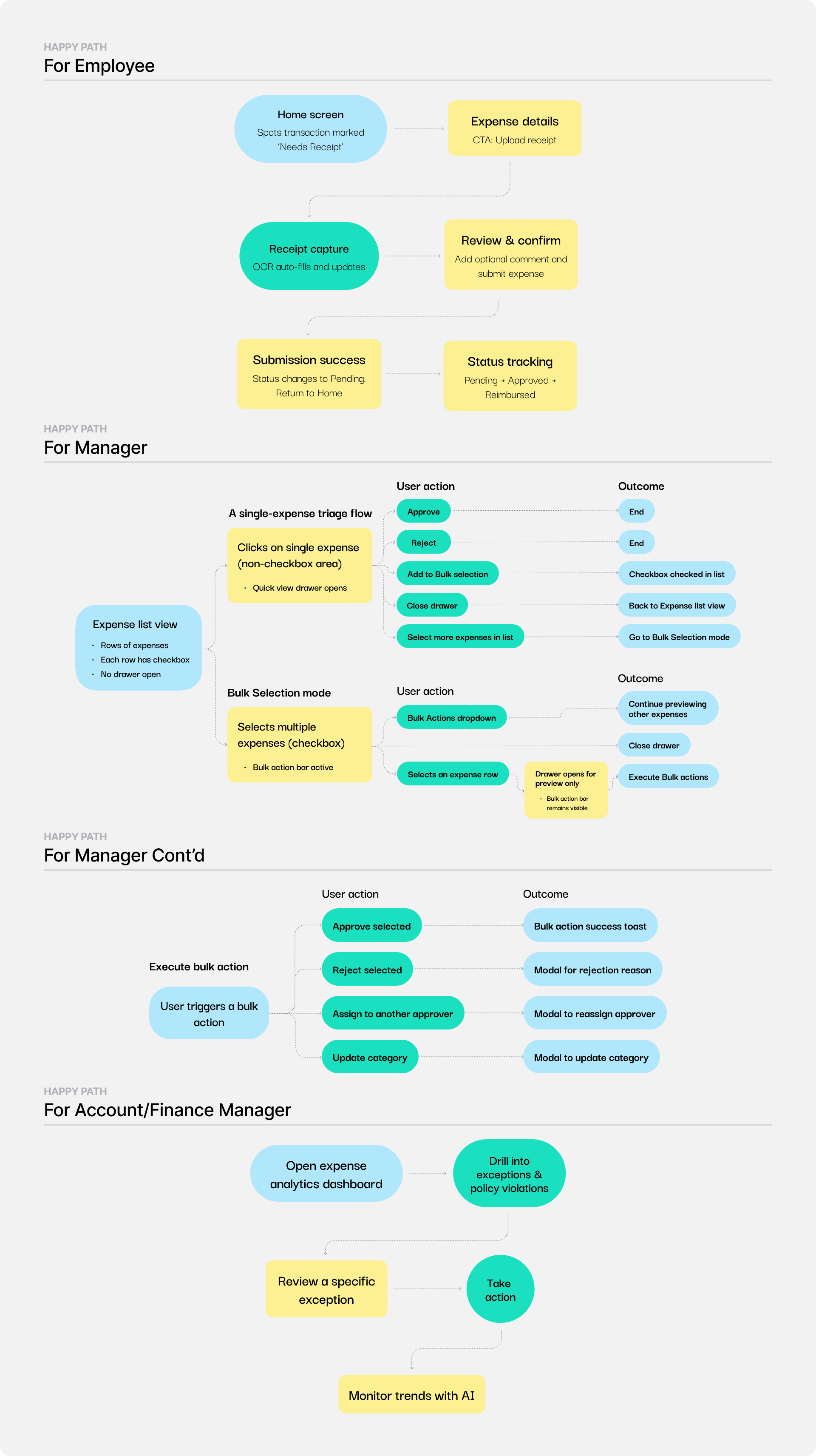
Based on the decision responsibilities of each role, I designed distinct “happy path” workflows that optimize for clarity, speed, or control depending on where decisions are made and how often they occur.


Employee, Happy Path


Design intent:

Minimize friction and reduce downstream review issues.


Key characteristics:
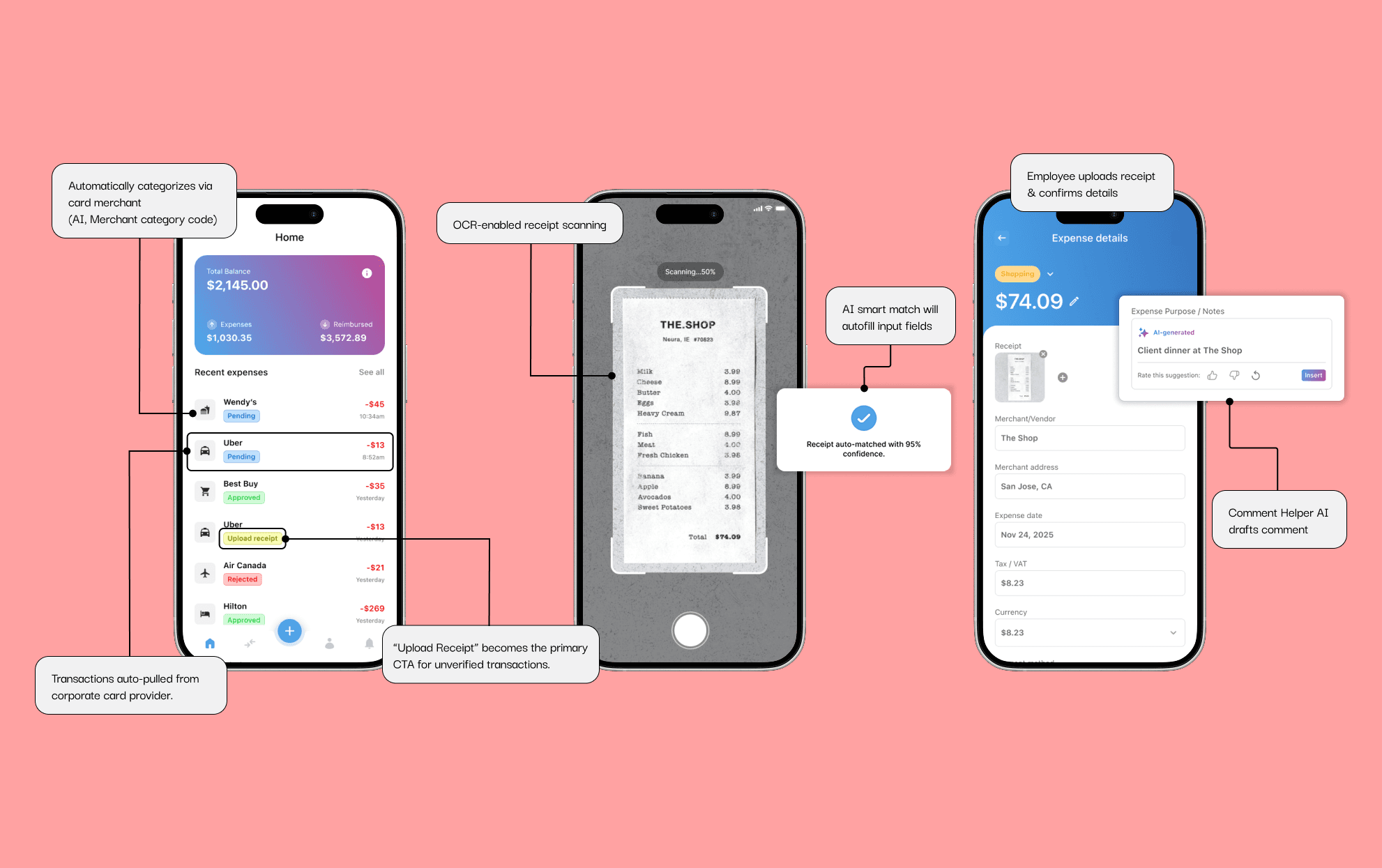
  • Guided submission with real-time feedback

  • OCR-assisted receipt capture to reduce manual input

  • Clear status visibility from submission to reimbursement


Manager, Happy Path


Design intent:

Enable fast, confident decisions at high volume.


Key characteristics:
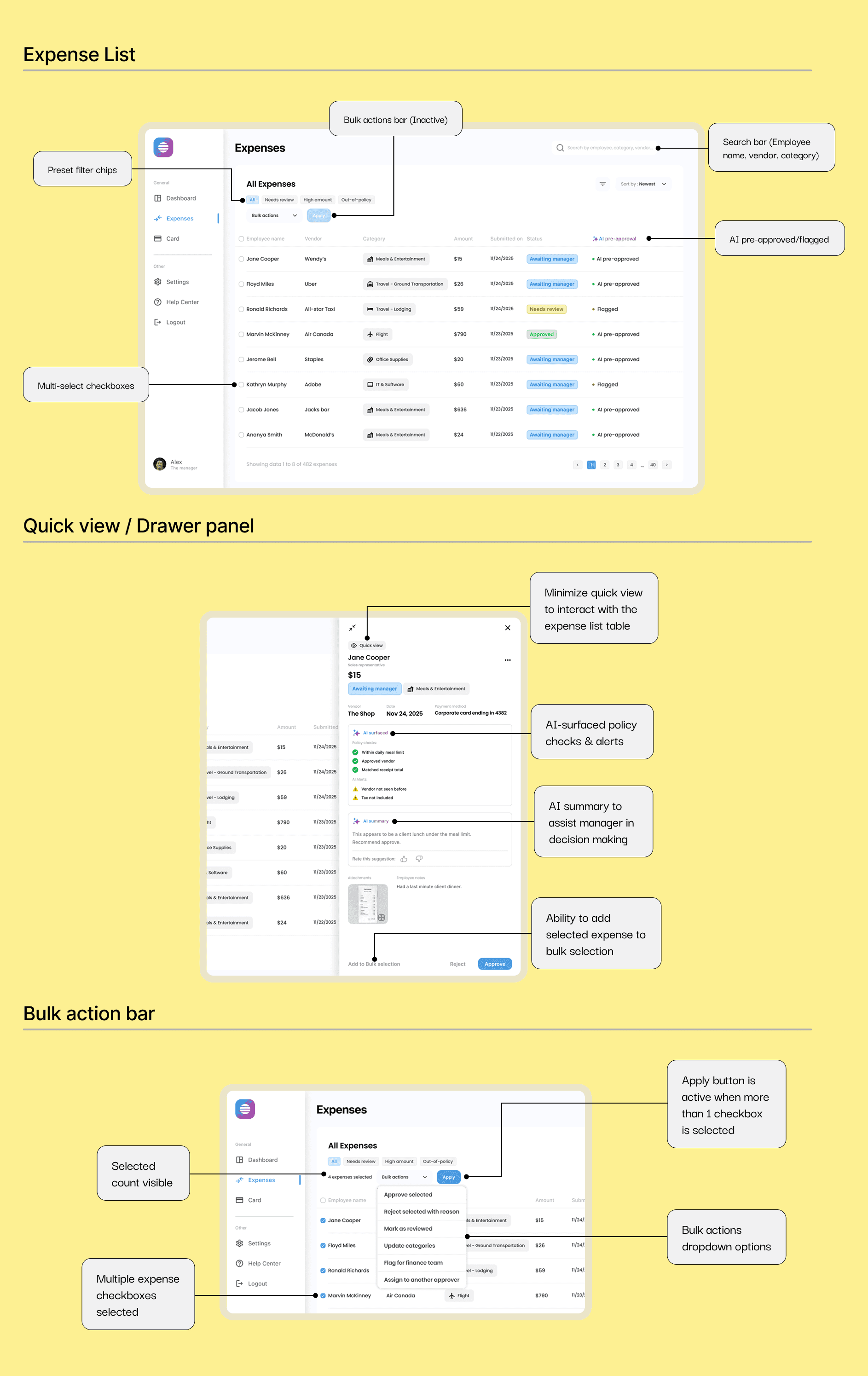
  • Quick-view drawer for single-expense triage

  • Seamless transition between single and bulk actions

  • Bulk approvals for low-risk expenses with minimal context switching


Account/Finance, Happy Path


Design intent:

Surface risk and exceptions without forcing manual review of everything.


Key characteristics:
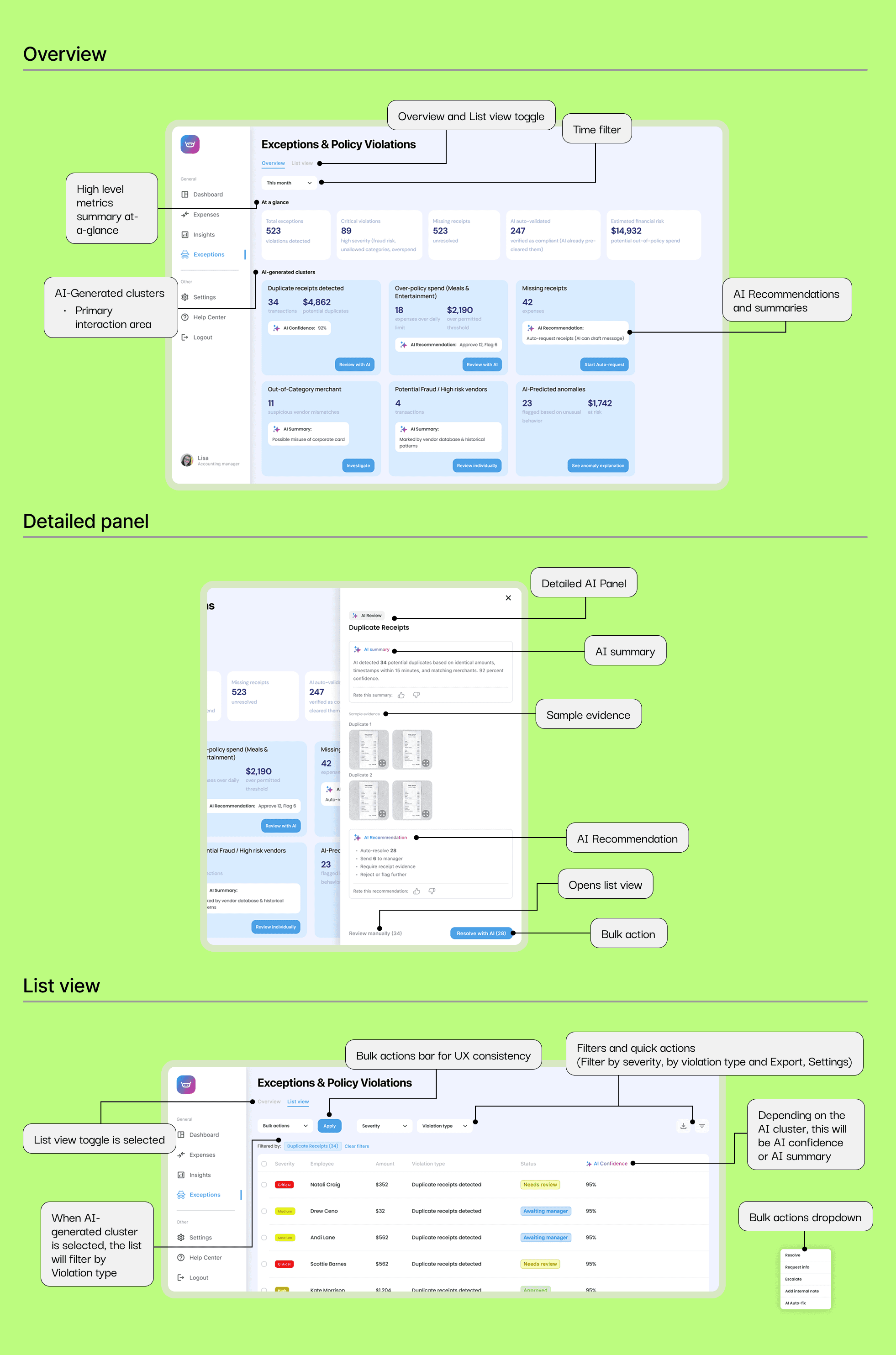
  • AI-assisted exception and policy violation overview

  • Ability to drill into specific anomalies

  • Trend monitoring to identify systemic issues over time

Employee Experience: Mobile Submission & Tracking


Employees interact with expense management in short, task-focused moments, often immediately after a purchase. The mobile experience prioritizes speed, clarity, and guided submission to reduce friction and prevent downstream review issues.

Manager Experience: High-Volume Review Across Devices


Managers review expenses frequently and often under time constraints. Their experience is designed to support fast decision-making across devices, with deeper inspection available when needed.

Accounting & Finance Experience: Exception-Driven Oversight


Finance teams are accountable for policy enforcement and audit readiness. Their experience is designed for deep analysis, exception handling, and pattern recognition rather than individual expense review.

Employee Experience: Mobile Submission & Tracking


Employees interact with expense management in short, task-focused moments, often immediately after a purchase. The mobile experience prioritizes speed, clarity, and guided submission to reduce friction and prevent downstream review issues.

Employee Experience: Mobile Submission & Tracking


Employees interact with expense management in short, task-focused moments, often immediately after a purchase. The mobile experience prioritizes speed, clarity, and guided submission to reduce friction and prevent downstream review issues.